
222% up to $2,000 + 222 FS

Blaze Spins Login & Registration — CA
The Blaze Spins login page is your single gateway to 13,000+ games, active promotions and a full Canadian banking suite. Whether you are signing in for the first time or returning after a break, Blaze Spins keeps the path short: one account, one profile, one click to start playing. This guide covers every step — access, registration, email verification, and what to do when something goes wrong.
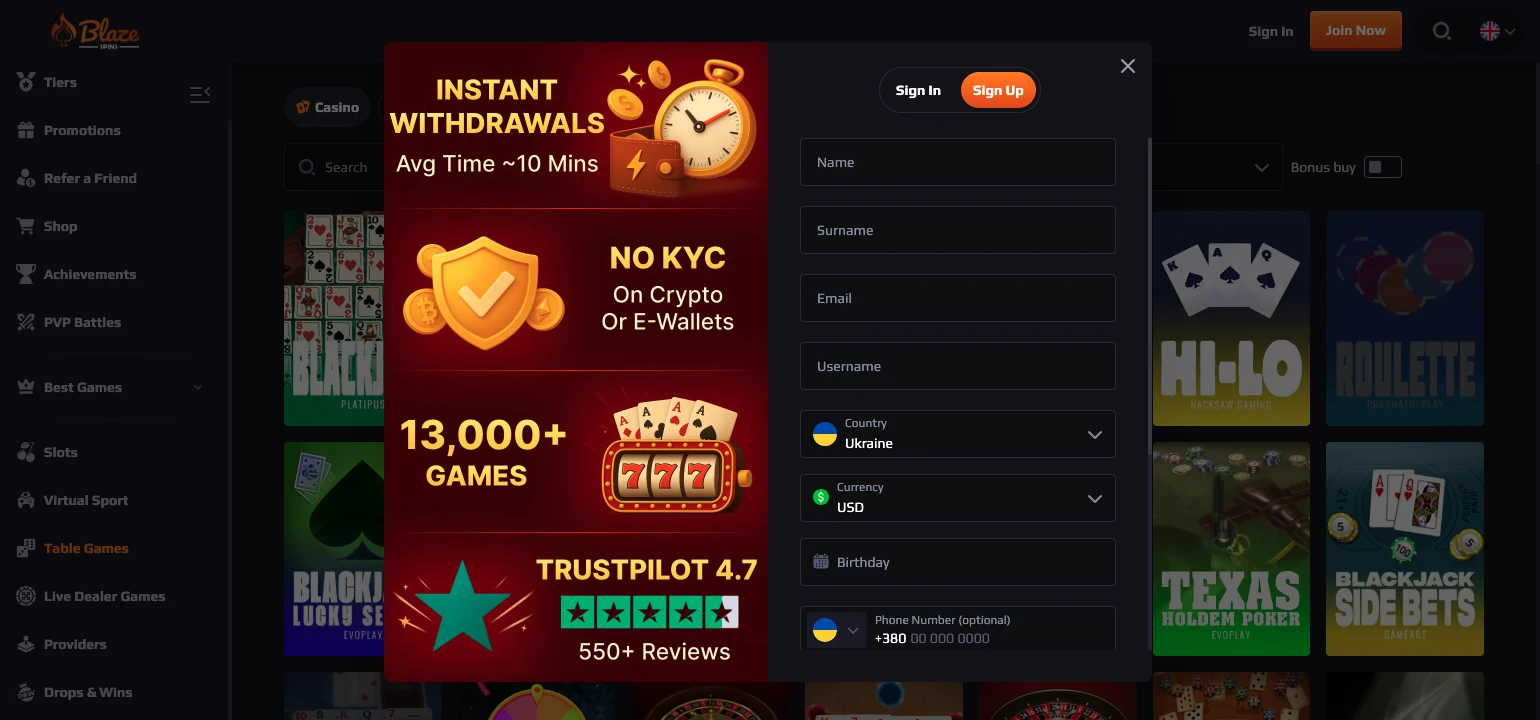
Reaching Your Account
Blaze Spins Casino login is available from every page on our platform — the sign-in button sits in the header at all times, so you never have to navigate back to the homepage to get in. Your single profile works identically on desktop and mobile browser; no separate app or second account is required, and all your balances, bonuses and history carry across devices automatically.
Here is what one account gives you in practice:
- Sign-in link visible on every page — no hunting required
- Same Blaze Spins profile on mobile, tablet, and PC with no extra steps
- One account per player — duplicate accounts are strictly against our terms
- Live chat available 24/7 if you are ever locked out and need immediate help
If you are locked out, our support team reaches you instantly through live chat, and a password reset is sent by email within minutes. For a full overview of the online Blaze platform options, including game categories, promotions and VIP details, visit our main page. We protect all data with 256-bit SSL encryption, so every sign-in is secure from the first keystroke.
Creating an Account
Blaze Spins Casino registration takes under three minutes — click the sign-up link, complete the form, and your account is live. The form asks for a username, your country (Canada), your preferred currency (CAD), your birthday, a Canadian phone number with the +1 prefix, and a password you choose yourself. Every field is mandatory, and the information you enter here is what we use to confirm your identity if a KYC check is ever needed.
Follow these four steps to go from zero to active account:
- Enter your email address — this is where your verification code arrives
- Create a strong password — mix letters, numbers and symbols for best security
- Add personal information — username, birthday, phone number (+1), country set to Canada
- Review and confirm the form before submitting
Once you submit, you move directly to the email verification stage. Exploring the exclusive Blaze promo codes beforehand is worthwhile — our welcome offer of 222% up to $2,000 + 222 Free Spins activates on your first deposit. Blaze Spins sign up Canada is available to players aged 18 and over, and completing Blaze Spins Casino registration correctly on the first attempt avoids any delays before your bonus is applied.
Confirming Your Email Address
Between submitting the sign-up form and playing your first game sits one quick step — email verification. We send a six-digit code to the address you provided, and you enter that code on-site to activate your account. The code expires, so check your inbox promptly after registering.
| Stage | Action |
|---|---|
| Code sent | Six-digit code delivered to your registered inbox |
| Code entered | Account activated; access to all games and features unlocked |
If you have questions about any part of the process, our Blaze FAQ section covers verification, deposits, and everything in between — check it before contacting support. Blaze Spins uses this email address as your primary security contact going forward, so make sure you have access to that inbox at all times. A confirmed account also qualifies you immediately for our VIP Tiers Program, which begins at Bronze III the moment you start playing.
When Sign-In Fails
Blaze Spins Casino login failures almost always come down to two causes, and both have fast fixes. A wrong password is resolved with a standard email reset, while a missing verification code is usually hiding in your spam or junk folder.
| Problem | Fix |
|---|---|
| Wrong password | Use the “Forgot Password” link; reset email arrives within minutes |
| Code not received | Check your spam/junk folder; request a new code if still missing after five minutes |
| Account locked | Contact 24/7 live chat for manual review and reinstatement |
Most sign-in problems are resolved within five minutes without contacting support at all. Our team is reachable around the clock at live chat and by email at support@blazespins.info if the self-serve options do not clear the issue.
What Opens After Login
The moment you sign in, our full platform is available — no loading delays, no restricted preview mode. Every feature you see below is accessible from the main screen immediately after your credentials are accepted.
- Wallet button beside the balance display — deposit via Interac, debit/credit card, or crypto in seconds
- 13,000+ games across slots, live casino, table games, crash games, game shows and more
- PVP Battles — enter player-vs-player contests via OnlyPlay titles from as little as $20
- Coin Store — redeem coins earned in gameplay for up to 100 free spins on selected titles
Blaze Spins carries an average RTP of 97.45% across its library, and the Drops & Wins prize pool from Pragmatic Play reaches up to $2,000,000. Payouts process within 0–3 days, with Interac and crypto withdrawals typically clearing in 24–48 hours — the fastest routes available to Canadian players.
Keeping Login Details Private
Your Blaze Spins Casino login credentials are yours alone — never share your password with anyone, and never allow a third party to access your account. We enforce a strict one-account-per-player policy, and any duplicate accounts detected are closed immediately, with balances potentially forfeited. Our platform is open only to players who are 18 or older; age verification may be requested at any time at our discretion.
Use a unique password for our site — one you do not reuse across other platforms. If you suspect your credentials have been compromised, reset your password immediately and contact live chat. Blaze Spins also protects your connection at every point with 256-bit SSL encryption, meaning your login data travels encrypted from your device to our servers without exception. Responsible gaming tools are available on our dedicated page, and we encourage every player to review session limits before depositing.
Who This Access Guide Serves
This guide is built for two types of Canadian players: those completing Blaze Spins sign up Canada for the very first time and those returning after time away who need a quick refresher on login steps or account security. New players benefit most from the registration walkthrough and the email verification table, which eliminates the most common activation delays. Returning players find the troubleshooting table in the sign-in section the fastest route back to play. Blaze Spins holds an Anjouan Gaming License and operates under 256-bit SSL security, so every player — new or returning — enters through a protected, properly licensed gateway each time they sign in.
Frequently Asked Questions
How do I confirm my email at Blaze Spins?
After you complete the registration form, we send a six-digit code to the email address you entered. You enter that code on the verification screen on our site, and your account becomes active immediately. Blaze Spins Casino login is available the moment that code is accepted and your profile is confirmed. If the code does not arrive within a few minutes, check your spam folder before requesting a new one.
What details does registration ask for?
Blaze Spins Casino registration collects your username, country (Canada), preferred currency (CAD), birthday, phone number with the +1 prefix, and a password. All fields are required, and the information must be accurate because it may be used for KYC verification later. Submitting incorrect details can delay withdrawals or trigger an account review.
Where is the wallet button?
Our wallet button sits directly beside your balance display at the top of the screen after you sign in. Click it to access deposit options — Interac and debit/credit card both require a $30 minimum, while crypto deposits start at $20. Blaze Spins processes deposits instantly in most cases, so funds are available for play within seconds of a confirmed transaction.
What if the six-digit code does not arrive?
Check your spam or junk folder first — automated verification emails are sometimes filtered there. If the code is not there after five minutes, request a fresh code through the verification screen. Our 24/7 live chat team can also manually check your account status and push a new code if the issue persists.
Can I open more than one account?
No. Our one-account policy is absolute — each player may hold exactly one account on our platform. A Blaze Spins login for a second account created by the same individual is treated as a duplicate and closed without notice. If you previously had an account and cannot access it, live chat can recover it — creating a new one is never the solution.